Microsoft Teams:
Where Ham Radio Comes Alive Online
The all-in-one platform that lets ham radio enthusiasts chat, meet, share ideas, and collaborate — 24/7, from anywhere in the world.
PERFECT FOR AMATEUR RADIO COMMUNITIES


THE MODERN COLLABORATION HUB
What is Microsoft Teams?
Instant Messaging
Real-time chat with notifications, threads, reactions, and @mentions
Video & Audio Meetings
Host up to 1,000 participants with screen sharing
File Collaboration
Co-edit Word, Excel, PDFs in real time
Calendars & Events
Schedule nets, meetings, and Field Days
Organized Channels
Keep every topic in its own dedicated space
Secure & Private
Only invited members can join your club space







Microsoft Teams is the complete communication and collaboration platform from Microsoft. It replaces email chains, scattered group chats, and conference calls with one secure, all-in-one workspace.
Chat, meet, and call — all in one place
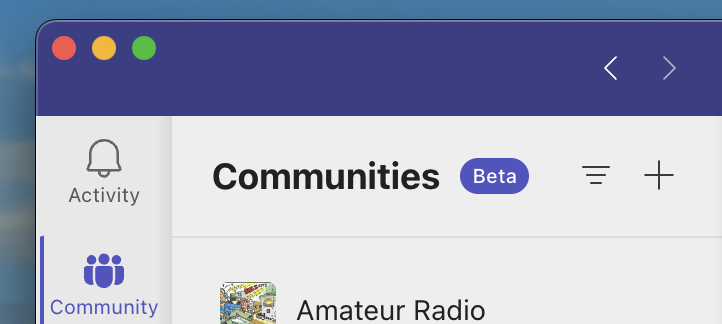
Organize conversations into channels and teams
Share files, edit together, and integrate with Microsoft 365 apps
Works seamlessly on desktop, web, and mobile as an App or via a Browser window
Used by millions of organizations — now perfect for hobby communities too.
Your Digital Ham Shack
Microsoft Teams turns any group of radio operators into a vibrant, always-on community — no matter where they live.
Stay Connected Daily
Post your latest contacts, propagation conditions, or “just worked” moments in the General channel. Everyone sees it instantly — even when they’re not on the air.

Face-to-Face Video Nets
Host your weekly club net via video. See everyone’s faces while sharing QSL cards, discussing new equipment, or reviewing contest results — all without leaving home.
Collaborate on Projects
Work together on antenna designs, build logs, or club repeater projects. Co-edit schematics, share photos of your latest build, and brainstorm ideas in real time.


Built for Ham Radio Communities
Everything you need to keep your group active and engaged — on the air and online.
Persistent Group Chat
Create topic-specific channels like “DX Pileups”, “Homebrew Projects”, “License Study Group”, or “Off-Topic Chatter”. Messages are searchable forever. Share photos of your shack, links to rare DX, or just say hello at 2 a.m.
Reactions & emojis (perfect for “73!”)
@mention any member
Threaded replies for deep discussions
Search by single of multiple keywords making finding the right message posted easy
Live Video & Audio Meetings
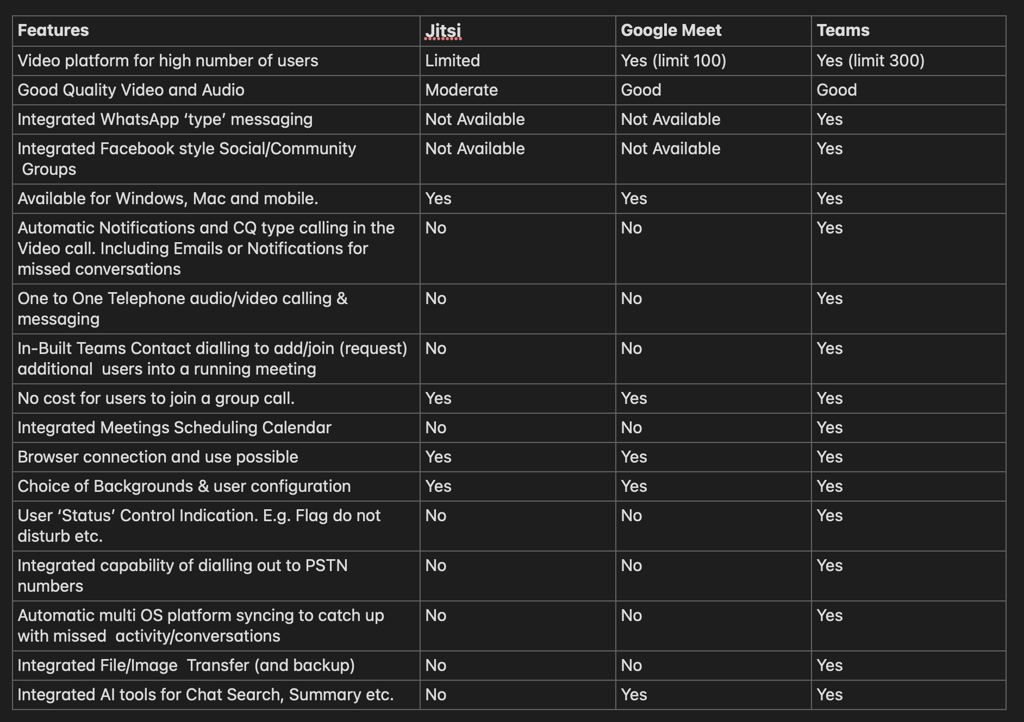
Host your monthly club meeting, technical presentation, guest speaker session, or emergency communications drill. Up to 300 participants can join with full video, screen sharing, and live captions.
Work Together on the Hobby
Upload antenna blueprints, repeater diagrams, or contest logs. Multiple people can edit the same document at once. Use built-in OneNote for club minutes, shared task lists for Field Day setup, or Planner for organizing the next hamfest.
Move your club away from 'tracked advert driven' platforms towards a better online integrated service for your community.
Or you can build your own club online in Teams yourself.




"Why Teams..."
Gets you away from Social Media platforms with their advertising and tracking algolrithims & it offers significant additional bonus integrated features:
It gives users not only the ability to have group video chats, but also the ability to do free one to one calls/text to friends and colleagues when they are available just like an ordinary telephone phone from the desktop or mobile device in a single integrated app etc.
This together with the wider Teams community groups provides an integrated set of options to communicate and get involved as well as maximising your time and minimising the effort that is required.
Your Personal Phone system...
Teams




Personal Contacts Lookup

You can create a personal 'contacts' list of friends that are also on Teams and do an audio (or video) call anytime to chat/Text with them for free. (Desktop & Mobile) all integrated into the single application.
You can invite others into any ongoing call anytime if required, as well as check on their availability status etc.
As well as this 'one to one' calling phone system you can setup common interest 'groups' of individuals and schedule regular meeting with the same friends. (e.g. an Group call)
You can also dial standard external PSTN numbers for inclusion(not free) with the call or include non Teams users can be sent invites to join a call via browser etc.
It is possible to also purchase 'stand-alone' desk style phones which have Teams built in (and certified) but these are not cheap.
A low cost option can be accomplished using an existing VOIP phone which has Bluetooth to link up with say your mobile phone (which has the Teams app) and hence answer/dial call through that handset connection of your VOIP desk phone.